Meet Rothbot: How an AI Revenue Analyst Became Monte Carlo’s GTM Connective Tissue

On any typical day at Monte Carlo, the same Slack bot gets asked a variant of these types of questions:
- From our CEO, heading into a prospect meeting: which of our current customers are most similar to this company?
- From an account executive: do we have any manufacturing customers, and are there public case studies I can share?
- From a seller whose prospect is weighing the build vs. buy debate: what materials should I send them?
- From a product marketer preparing an enablement session: summarize Reinforcement Loop based on the content we’ve created, and tell me how to pitch it without going too deep.
Then, at 1 p.m., the bot posts its own daily report outlining every customer whose consumption moved meaningfully overnight with details as to why.
This is a day in the life of Rothbot, an automation that started as a revenue analyst but quickly became a source of truth for everyone at Monte Carlo to go to when they need an answer that exists somewhere across our tech stack – be it Snowflake, Salesforce, Gong, HubSpot, Notion, and essentially anywhere else. If you know the answer exists somewhere in the internal ether of Monte Carlo, Rothbot can find it for you.
It all started with a table and a slash command
Rothbot’s namesake comes from its builder, Adam Rothrock, who operationalizes the AI program for Finance and GTM at Monte Carlo.
The first version of this system, before it became the Rothbot we know today, was a Claude Code slash command. You typed /rothbot and a revenue question, and it answered with SQL-backed data from a single Snowflake table: the finance team’s consumption revenue model, with one row per customer per day.
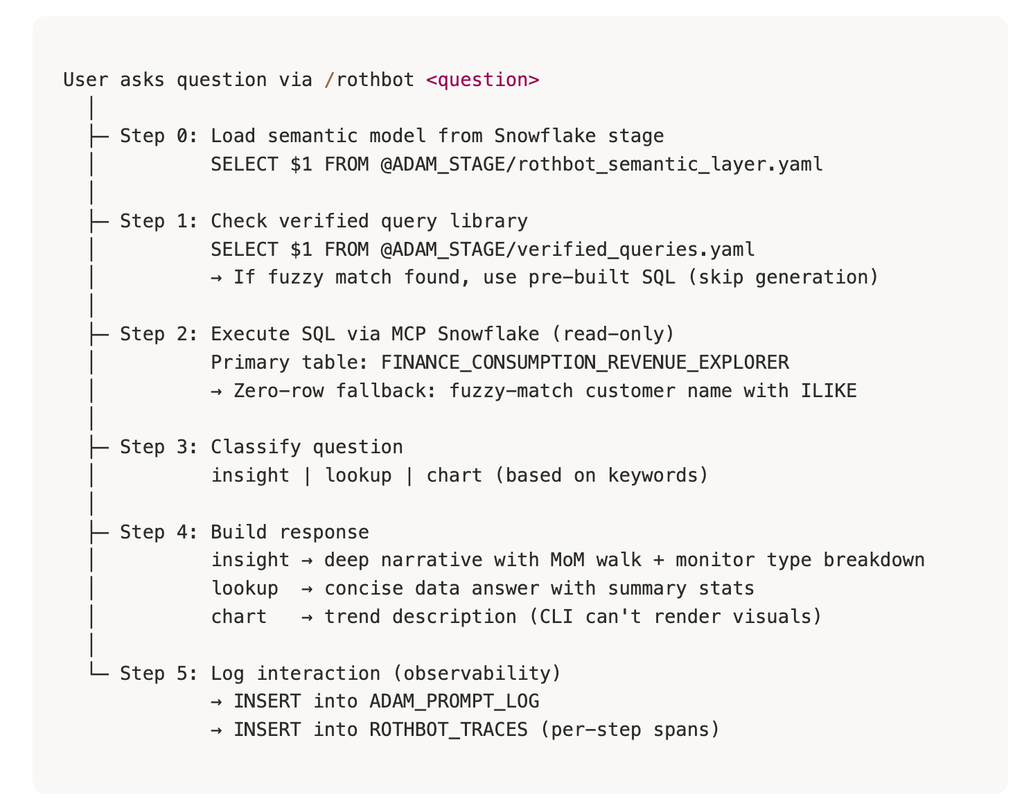
Adam built a few habits into that first version that are still integrated into Rothbot:
- Load a semantic model first. Before writing any SQL, Rothbot reads a YAML file that defines every dimension and measure, plus the rules for querying them. For example: use the most recent snapshot date for “current state” questions, and use every date for trends.
- Check a verified query library. If a question closely matches one that’s already been answered correctly, Rothbot reuses the proven SQL instead of writing new SQL.
- Log everything. Every question, the SQL it generated, whether it worked, and a trace of each step goes into a log table.
The last habit, logging everything, ended up being critical for Rothbot, and informed everything Rothbot later learned how to do.
From command line to company-wide teammate
Within weeks, Rothbot moved into Slack and its scope grew quickly. Today, employees DM it or @-mention it across channels in Monte Carlo’s workspace.

It answers questions about revenue, pipeline, accounts, marketing, and product usage, using a curated semantic layer over Snowflake and read-only connections to Salesforce, Looker, Gong, HubSpot, Mixpanel, Notion, Datadog, Sentry, and the Monte Carlo product itself.
It also runs on a schedule:
- Weekly Northstar digests for leadership, covering revenue, new-logo pipeline, and weekly active users.
- A daily “Revenue Movers” report that explains each meaningful day-over-day change in customer consumption, not just the fact that it moved. Rothbot checks whether the customer edited monitors, ingested a block of new tables, used one of our agents (Troubleshooting, Triage, or PR agents), or lost coverage that might point to a collector problem rather than churn. Changes it can’t explain get flagged for manual review, not guessed at.
- Operational digests, including an anomaly report and an agent observability summary.
Rothbot has also grown from analyst into operator. Alongside its scheduled jobs, it handles marketing-ops work on demand: loading event and webinar attendees, building HubSpot lists and campaigns, and checking that leads flowed through to Salesforce. All of this happens in Slack, with a human confirming before anything is written.
A purpose-built web application, the GTM Hub, grew up around the bot to provide a centralized place for our sales teams to manage their account lists and access the latest documents on plans and pricing.
Other people now build on top of the GTM Hub that pulls from Rothbot. A summer finance intern shipped a customer-level revenue forecast into it. Our GTM enablement lead built a dedicated view for messaging learnings, where sales reps could reflect on how certain concepts and ideas landed with different customers and refine their approach. A marketing section was added for webinars and events. The field engineering team built a skill to generate account-health insights that runs on the same infrastructure.

The connective-tissue moment: serving marketing content
In September, Rothbot began reading directly from product marketing’s content database in Notion.
The problem it solved is familiar at any growing company: sellers need the right one-pager, blog, or demo for the conversation they’re in. The content exists, but it’s spread across many different surfaces: Notion, Google Drive, the website, YouTube, and even one-off Slack conversations. The requests for information and documentation were piling up as Slack pings, with no paper trail or way for reps to reuse the same thing easily.
Rothbot has enabled us to resolve the chaos.
Now, a seller asks Rothbot for what they need directly in Slack. It checks the content database, which is refreshed via a scheduled workflow, and returns the relevant assets with links.
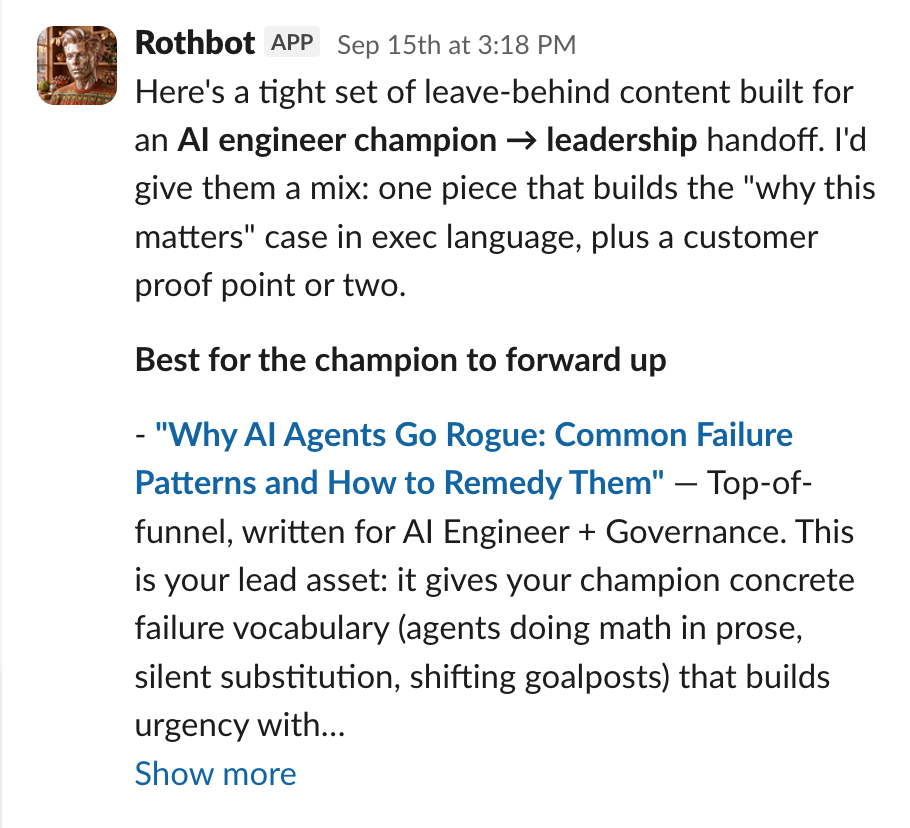
The reaction was extremely positive when this solution was rolled out to the GTM teams: “People LOVED that Rothbot is serving content now, that was definitely a hit.”
Resources from every sales enablement session are now deposited into the content database and are something you can simply ask Rothbot for as you need to reference them.
How Rothbot gets better every night
Rothbot answers questions all day, so it also fails all the time in small ways.
Adam’s answer to that was to build a reinforcement loop so Rothbot could learn and improve constantly.
Each night, a scanner reads every Slack thread Rothbot took part in and looks for failure signals: thumbs-down reactions, corrections like “that’s wrong” or “try again,” error phrases, or threads that needed three or more follow-ups.
An LLM judge then classifies each conversation. For every failure, a second model splits the root cause into typed fixes:
- Knowledge gap: the bot didn’t know something it should have.
- Feature request: the bot can’t do something it should.
- Guardrail: the bot did something it shouldn’t have.
- Eval case: lock in this failure as a test once it’s fixed.
- Verified query: the bot got the SQL right, so remember it.
A favorite example: users kept asking for large breakdowns, and Rothbot kept replying “here’s the CSV,” pointing at a file that didn’t exist. If this were treated as one bug, a ticket would sit for weeks while the bot kept overpromising. Decomposed, however, the same failure became three fixes by the next day: a guardrail that stopped the fake attachments that night, a feature request for real exports, and an eval case so the fix can’t quietly regress later.
Since then, the single loop has grown into a small fleet. A router sends each issue to a queue (core platform, new features, the BI suite, knowledge, or hotfixes), and each queue has its own tempo.
Complex features wait for Adam to read the PR. Knowledge fixes can ship on their own within minutes, because if a user explains a data quirk mid-conversation, that knowledge shouldn’t have to wait hours or days to be acted upon.
Adam has written about Rothbot numerous times on the Rothbot Substack.
One example that epitomizes the self-learning loop is a standout moment for the little bot: a core user chained questions across several semantic layers and then asked for a styled PDF. Rothbot stumbled. An hour later, a PR had merged with fixes pulled straight from that thread. This was all automated – no human was ever involved in writing a ticket.
The newest lane closes the loop with our own product. Rothbot sends its traces to Monte Carlo’s Agent Trust platform, Monte Carlo’s Reinforcement Loop flags where the agent misbehaves, and a dedicated lane turns each finding into a fix. In its first week it shipped four.
When Rothbot is wrong, in public
Part of what makes Rothbot trustworthy is how its mistakes get handled: out in the open.
In one case, a rep asked why a deal was lost. Rothbot didn’t have the loss-reason fields because they weren’t being loaded into Snowflake. It inferred a reason anyway and stated it confidently. It was way off, so Adam replied in the thread with the real answer, pulled from Salesforce and Gong, and then outlined the reasons for the failure: missing ingestion, a fuzzy match on call titles, and an agent that guessed when it should have hedged. He filed tickets for all three and Rothbot improved.
In another case, Rothbot reported that an account was barely using the product. In fact, the account ran most of its activity in a second regional instance that several upstream data models excluded. The conclusion was the opposite of what it reported: this wasn’t an account that needed activating, it was one that was actively ramping up.
These types of failures stemmed from the data powering Rothbot. In one case, a field was never loaded, and in another a region was excluded by a tag. In other instances, Rothbot lost permissions to the Salesforce and Gong schemas.
This is a lesson that many Monte Carlo customers are learning as they deploy agents into production at scale. An agent is only as reliable as the data and context it runs on.
What adds to the magic is that Rothbot sends its traces into Monte Carlo’s own Agent Trust platform, and we monitor the tables it depends on. We use the same product we sell to keep our own agent reliable and performant. It works as both a feedback loop for our product team, as well as a way to keep the connective tissue that is Rothbot healthy.
Guardrails before ambition
Rothbot touches sensitive business data, so its access is deliberately narrow:
- Rothbot is read-only by default. Its few write actions, like building a HubSpot list or updating a Salesforce opportunity, are admin-only, require a preview-and-confirm step, and are audited.
- It never touches customers’ data warehouses or the data in them. It works only on Monte Carlo’s own GTM, finance, and product data.
- It proposes fixes for platform alerts, and every change to Rothbot’s own code must pass automated tests and security review before it ships.
Adam also keeps a living inventory of every use case, data source, and write surface, which our security team reviews on a regular basis.
As Rothbot moves toward hosting other people’s agents and letting users register their own schedules, security questions are settled before launch, not after.
Key learnings from Rothbot for other teams
Many organizations are taking a similar approach to the one Adam took with Rothbot, where many of the internal workings that help a company run get agentified into some central resource. As we’ve outlined above, there are certainly challenges that come up along the way for this type of initiative.
The learnings we’d share with teams on the journey to building their own Rothbot are these:
- Start narrow and log everything. One table, one semantic model, and every interaction traced. The logs later became the input to the entire self-improvement system.
- Put your knowledge in git. If knowledge, guardrails, and evals live as code, an agent can fix them. If they live in a wiki, a human has to.
- Let failures produce fixes, not tickets. Evals are the cheap part. Turning their output into merged changes is where the value is.
- Decide what the agent won’t do. Choosing not to generate content made Rothbot more useful to PMM.
- Watch the data under the agent. Most of Rothbot’s worst answers traced back to data it couldn’t see.
Rothbot began as a way for one person to answer revenue questions faster. It now links finance, sales, marketing, and leadership in one Slack thread, and it gets a little better every night. As Adam puts it, the agent has decent self-awareness, but only as much as the context you give it.