What Do Your Snowflake Cortex Agents Actually Cost? Now You Know

Snowflake Cortex has made it easy to put an AI agent right next to the data that feeds it. Teams are shipping Cortex agents that answer questions, write SQL, and run workflows, often across several business units at once.
Now the bill is arriving, and people want to know two things: what are these agents costing us, and is it worth it?
Each team wants a different answer. Finance wants one number it can trust. Platform teams want to know which agent, conversation and query is driving spend. Executive sponsors ultimately want to see ROI.
Why AI cost is so hard to pin down
For Cortex agents, that answer is harder to get than it looks. Snowflake bills in credits, and an agent spends them in two places: the LLM tokens it uses and the warehouse compute behind every query it runs. A token count covers only the first.
Spend is climbing fast, and most teams find out after the fact. A data leader at one of our customers put it plainly:
“No one wants to spend money on AI anymore. Everyone wants to manage the cost.”
They expect AI spend to cross “a higher six figure number and probably up to seven if we continue with the pace we are going.”
A platform team running several production Cortex agents asked for exactly this: not just token consumption, but the cost of each query the agent runs.
What you can do now
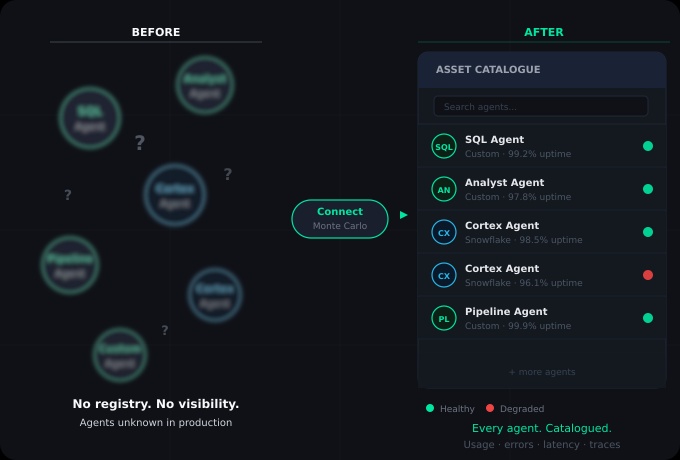
Monte Carlo is now solving for this difficulty in reconciling true agent costs for Snowflake Cortex agents. Users can now:
See cost wherever you see tokens. A Cost (credits) card now sits on the agent summary next to traces, latency, and tokens. There’s also a per-trace cost column, cost on conversations and individual turns, and a cost trend chart. Costs are calculated from the agent’s own spans and priced against Snowflake’s published credit table.
Count the queries, not just the tokens. Cost now shows as token credits and query credits. The warehouse credits behind each query an agent runs are attributed to the span that ran it. The agent summary carries both figures, trace detail shows credits per span, and each span’s metadata breaks cost down by component. When someone asks “is that the whole number?”, now it is.

Plan ahead. The summary projects 30-day spend from the trailing 7-day average and shows what prompt caching saved you.
Find the expensive paths. Use min/max cost sliders on the traces and conversations lists to find the conversations driving spend.
Rank traces by what they cost. The traces list now has sortable columns for total cost, token cost and query cost. Sort by any of them to see which traces used the most credits this week.

Alert before the invoice does. Set a monitor on cost at the trace or conversation level, so a spend spike reaches you in hours, not at month-end.
Price at your own rates. Add rate overrides in Settings → Agent Observability so costs reflect the per-model rates your team actually negotiated, not list prices. Models without an override keep the default rate. Every cost view updates right away, with no backfill needed.

Better together: Snowflake and Monte Carlo
Snowflake gives teams one place to build agents on governed data, and Cortex agents run where teams already operationalize that data. Monte Carlo is what provides the trust layer, so that teams have the confidence of knowing what those agents do once they’re in production.
The extension into cost visibility is essential, as this becomes a crucial part of understanding the efficiency and impact of AI programs.
Monte Carlo calculates cost from each agent’s own spans, prices it against Snowflake’s published credit table (or your negotiated rates), and counts the warehouse credits behind every query. The number in your agent observability calculations matches how Snowflake actually bills you. It also sits next to the reliability signals Monte Carlo already tracks, like latency, errors and version-level performance. Teams can see what an agent costs and whether it’s working, in one place.
For finance, that means a number it can defend. For platform teams, it’s a way to find and fix the expensive paths. For executive sponsors, it’s the start of a real ROI conversation.
Get started
Cost visibility is live for Snowflake Cortex agents connected to Agent Observability. Ingestion into Monte Carlo-hosted deployments is enabled per account, so reach out to your Monte Carlo team to turn it on. Schedule a demo to see it in action.